
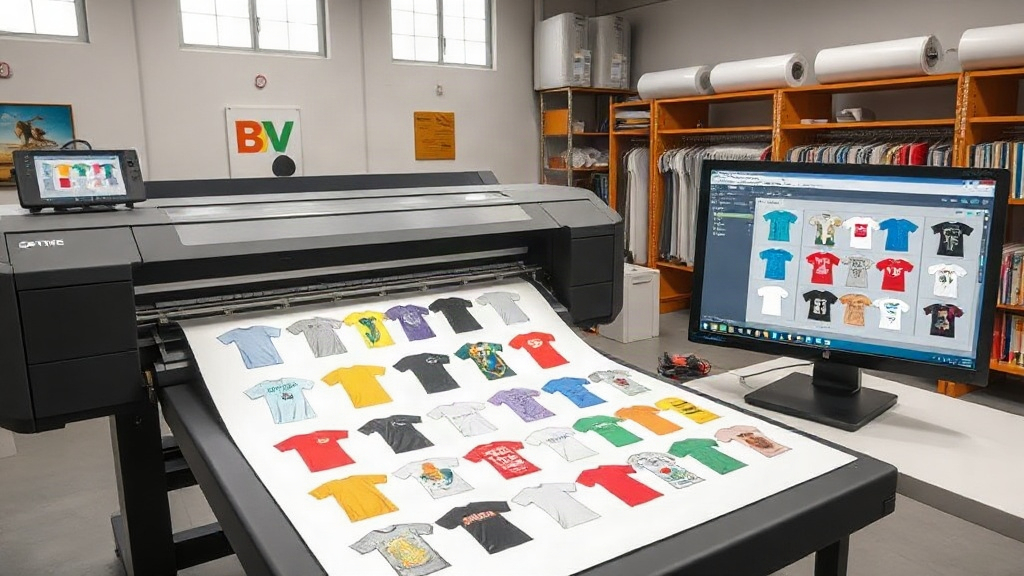
If you're in the custom apparel business, you've likely heard about DTF printing. It's a game-changer for producing vibrant, durable transfers on demand. But as your order volume grows, manually arranging designs on a sheet becomes a bottleneck. That's where a DTF gangsheet builder comes in. This tool helps you maximize every inch of film, cut material costs, and speed up production. In this guide, we'll walk you through everything you need to know about gangsheet builders, from the basics to pro strategies.
What is a DTF Gangsheet Builder?
A DTF gangsheet builder is software that arranges multiple designs onto a single sheet of DTF film. Instead of printing one design at a time, you nest them efficiently to minimize wasted space. Think of it like a digital puzzle solver for your transfers. You upload your artwork, and the builder automatically positions each piece for optimal use of the film. Most builders also let you adjust spacing, rotate designs, and set quantities. The result is a 'gang sheet' that you can print in one pass, saving time and money.
Why You Need a Gangsheet Builder for DTF Printing
Manual nesting is tedious and error-prone. You might squeeze in a few extra designs, but you're likely leaving gaps that cost you. A dedicated builder takes the guesswork out. Here are the key benefits:
- Material savings: By fitting more designs per sheet, you reduce film and powder consumption. Even a 10% improvement in yield can add up to significant annual savings.
- Time efficiency: Automated nesting cuts prep time from hours to minutes. You can focus on printing and pressing, not arranging.
- Consistency: Builders ensure uniform spacing and alignment, which leads to cleaner cuts and fewer errors.
- Scalability: As your order volume increases, a builder helps you maintain turnaround times without hiring more staff.
If you're still on the fence, consider this: a DTF gangsheet builder pays for itself quickly through reduced waste alone.
Key Features to Look for in a DTF Gangsheet Builder
Not all builders are created equal. Some are basic, while others offer advanced automation. Here's what to prioritize:
1. Automatic Nesting Algorithms
The best builders use intelligent algorithms to pack designs tightly. They consider rotation, spacing, and even irregular shapes. Look for options that let you set minimum gaps to avoid cutting errors.
2. Roll and Sheet Support
Whether you print on rolls or pre-cut sheets, your builder should handle both. Roll support is especially useful for high-volume shops.
3. Integration with RIP Software
Seamless integration with your RIP (Raster Image Processor) streamlines the workflow. You can export gangsheets directly to your printer without extra steps.
4. Customizable Templates
Save time by creating templates for common orders, like a dozen t-shirts with mixed sizes. Templates ensure consistency and speed.
5. Cost Calculation
Some builders estimate ink and film usage, helping you price jobs accurately. This feature is a must for shops with tight margins.
How to Create a Gangsheet: Step-by-Step
Ready to build your first gangsheet? Follow these steps:
- Prepare your designs: Ensure all artwork is in a compatible format (usually PNG with transparent background). Check that each design has proper resolution (300 DPI recommended).
- Choose your film size: Select the sheet or roll dimensions you'll be printing on. Common sizes include 13x19 inches and 22x36 inches.
- Upload designs: Import your files into the builder. Most tools let you drag and drop.
- Set quantities: Specify how many of each design you need. The builder will multiply and nest them.
- Adjust layout: Use auto-nesting first, then manually tweak if needed. Pay attention to spacing; too tight and you risk cutting into designs.
- Export and print: Save the gangsheet as a high-resolution file and send it to your DTF printer.
Pro tip: Always print a test sheet with new layouts to verify alignment and color accuracy.
Common Mistakes to Avoid with DTF Gangsheets
Even with a builder, some pitfalls can cost you. Watch out for these:
- Overcrowding: Packing designs too tightly can lead to cutting errors or ink bleeding. Leave a small gap (2-3mm) between designs.
- Ignoring film grain: DTF film has a directional grain. Rotating designs arbitrarily might affect adhesion. Check your film's recommendations.
- Forgetting mirroring: DTF transfers must be mirrored before printing. Most builders have a mirror option, but double-check.
- Neglecting color profiles: Use the correct ICC profile for your printer and film. Otherwise, colors may look off.
- Not updating software: Builders improve with updates. Regularly check for new versions to get better nesting algorithms.
Advanced Tips for Maximizing Your DTF Gangsheet Builder
Once you're comfortable with the basics, try these strategies to get even more out of your builder:
Batch Similar Jobs
Group orders with similar film types or color profiles. This reduces setup time and material waste.
Use Nesting by Shape
Some advanced builders can nest by shape, not just bounding box. This is ideal for irregular designs like logos with cutouts.
Automate with Scripts
If your builder supports scripting, you can automate repetitive tasks, like adding a standard set of sizes to every order.
Monitor Yield
Track the percentage of film used per sheet. Aim for 85% or higher. If you're below, adjust your nesting settings.
Frequently Asked Questions
What is the best DTF gangsheet builder for small businesses?
The best builder depends on your volume and budget. For small shops, tools like DTF Gangsheet Builder from dtffocused.com offer a balance of affordability and features. Look for one with automatic nesting, roll support, and a free trial.
Can I use a gangsheet builder with any DTF printer?
Most builders export standard file formats (like TIFF or PNG) that any DTF printer can read. However, some builders integrate directly with specific RIP software. Check compatibility before purchasing.
How much can I save by using a gangsheet builder?
Savings vary, but many shops report a 20-30% reduction in film and powder costs. The time savings are even greater, allowing you to take on more orders.
Is it hard to learn how to use a DTF gangsheet builder?
Not at all. Most builders have intuitive interfaces with drag-and-drop functionality. Many offer tutorials and support. You can typically master the basics in under an hour.
Do I need a gangsheet builder if I only print a few designs at a time?
Even for small batches, a builder helps you use film more efficiently. If you print regularly, it's worth the investment. Plus, as you grow, you'll already have the workflow in place.